Make a Payment by Cheque
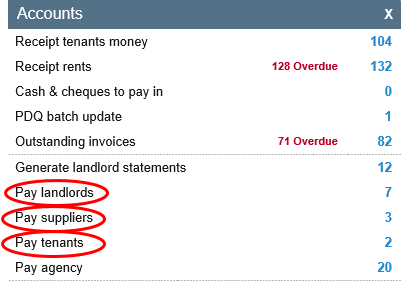
To pay a Landlord, Supplier or Tenant by Cheque, go to the Accounts Dashboard and select the relevant option.
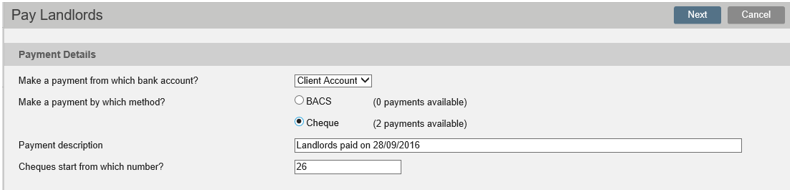
From this screen select Cheque and then click Next.
N.B. Cheque numbers can only be changed from this screen.
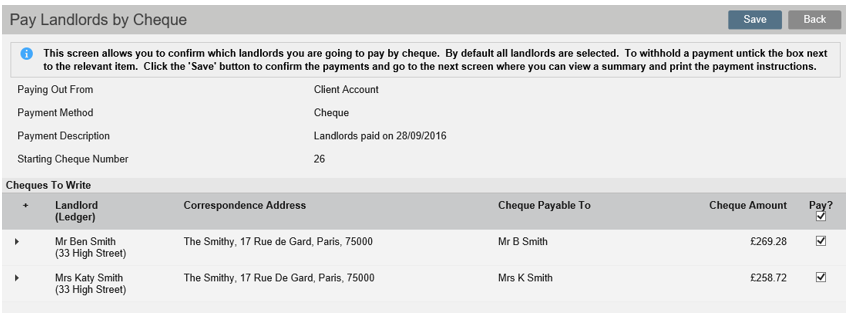
The next screen allows you to choose who you wish to pay. Add a tick next to all the Payments you wish to make, then Save.
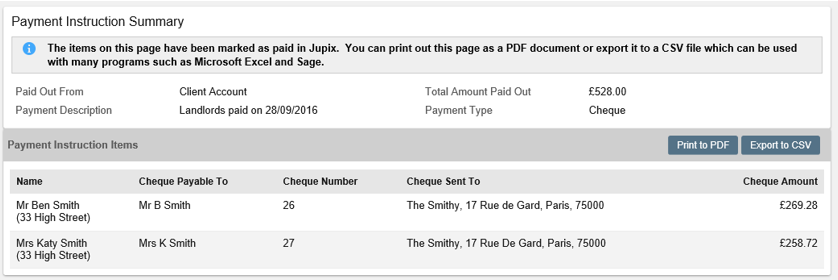
A Payment Instruction Summary will then be created, and can be Printed or Exported to CSV.
Was this article helpful?
0 out of 0 found this helpful
We're sorry to hear that. Can you tell us what went wrong?
We’re glad we could help! Is there anything you'd like to share with us?
This form is for Help Centre/Article feedback only.
This form is for Help Centre/Article feedback only.
Thank you! Your feedback helps us improve the Help Centre/this article for everyone.
Thank you! Your feedback helps us improve the Help Centre/this article for everyone.
Can't find what you're looking for? Contact support
