Follow the steps below to reinstate an archived record.
On the Tenancy record select the Tenant Ledger tab. Then select View.
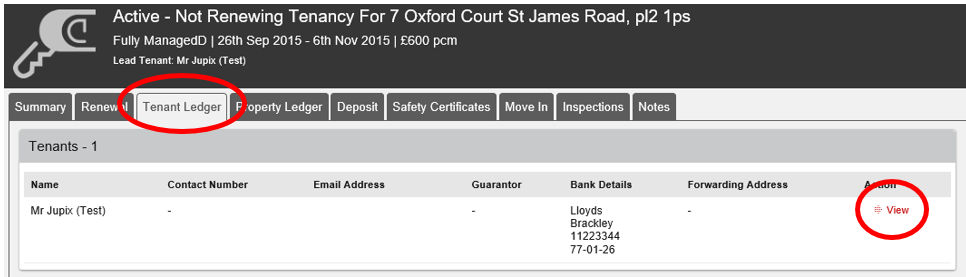
Select the tenant’s name.
Select Special Actions and Reactivate Applicant Record.
To activate the tenant click Save. You can then edit their contact details.
Was this article helpful?
0 out of 0 found this helpful
We're sorry to hear that. Can you tell us what went wrong?
We’re glad we could help! Is there anything you'd like to share with us?
This form is for Help Centre/Article feedback only.
This form is for Help Centre/Article feedback only.
Thank you! Your feedback helps us improve the Help Centre/this article for everyone.
Thank you! Your feedback helps us improve the Help Centre/this article for everyone.
Can't find what you're looking for? Contact support
